


Google Ad Grants Rules:A Rundown of Compliance Policies
- The Google Ad Grants program offers nonprofits up to $10,000 per month in free Google Ads spend — but only if you follow the rules.
- Seven core compliance requirements determine whether your account stays active: CTR, geo-targeting, CPC limits, active management, ad quality, keyword optimization, and conversion tracking.
- The most common reason nonprofits lose their grant isn’t intent — it’s missing one of these rules quietly for 90 days.
- Several rules have non-obvious workarounds: the $2 CPC cap can be bypassed entirely with Smart Bidding, and most accounts created after April 2019 are required to use it anyway.
- 2026 update: New nonprofit verification has shifted from TechSoup to Goodstack, and Performance Max campaigns are now allowed.
Google Ad Grants gives eligible nonprofits up to $10,000 per month in free Google Ads spend. That’s real money — and it stays yours only as long as you stay compliant.
Managing your Ad Grants account isn’t complicated, but it requires knowing the rules and actually following them. Here’s a plain-language breakdown of the seven core compliance requirements — and what you need to know about each one in 2026.
1. The 5% Click-Through Rate (CTR)
Your account must maintain a minimum 5% CTR each month at the account level.
Google wants its users to find relevant results, so if your ads aren’t enticing enough, your grant is at risk. The specifics: if your account-level CTR falls below 5% for two consecutive months, your account is subject to temporary deactivation. New accounts get a 90-day grace period to come into compliance.
To maintain that crucial 5% CTR, optimize your ads. Make them relevant. Make them compelling. Trim keywords that drag your average down. Performance Max campaigns are exempt from the 5% rule, so they don’t pull down your account-level CTR — useful to know if you’re considering adding them.
2. Geo-Targeting
Your ads must only target areas where your nonprofit operates.
If you’re a local organization operating in New York, don’t waste your grant budget targeting audiences in Los Angeles or London. Use geo-targeting to ensure your ads reach people in areas relevant to your nonprofit. This isn’t just compliance — it’s also one of the fastest ways to lift your CTR.
3. The $2.00 Maximum Cost-Per-Click (CPC) Limit
The maximum CPC you can set is $2.00 — but only when using manual bidding strategies.
Seems limiting, doesn’t it? Here’s what most articles miss: the $2 cap doesn’t apply when you use Smart Bidding strategies. With Maximize Conversions, Maximize Conversion Values, Target CPA, or Target ROAS, Google’s algorithms bid whatever they think a click is worth — sometimes well above $2. Real-world CPCs in actively managed grant accounts often run $5–$15 per click. Single clicks above $50 happen.
The catch: to access any of these strategies, you need conversion tracking properly set up on your site (which is Rule 7 below). No tracking, no Smart Bidding, no escape from the $2 cap.
Any Ad Grants account created on or after April 22, 2019 is required to use a Smart Bidding strategy for all campaigns (with limited exceptions for Smart Campaigns). If your account is newer than that, manual bidding isn’t even an option — and the $2 cap is effectively bypassed by default.
For most nonprofits competing on broader keywords, switching to a Smart Bidding strategy is the single biggest grant utilization unlock available. Most self-managed accounts use less than 30% of the available $10K/month — and stuck-at-$2-CPC is one of the most common reasons.
4. Active Management
Log in at least once per month, and make at least one change to your Ad Grants account every 90 days.
Google likes to see that you’re actively managing your account. Regularly logging in and tweaking your campaigns keeps Google happy and your account in good standing. The fastest way to lose a grant isn’t a bad campaign — it’s a forgotten one.
Beyond logins, there are a few structural rules in this category worth flagging:
- At least 2 active ad groups per campaign, each with closely related keywords
- At least 2 active ads per ad group (Responsive Search Ads are now the default; expanded text ads were retired in June 2022)
- At least 2 sitelink ad extensions at the account level
- Annual program survey participation — Google sends this once a year, and missing it can deactivate your account
5. High-Quality Ads and Website
Ads and keywords must be relevant to your nonprofit’s programs and services. Your website must also be high-quality.
Poor quality ads are a big no-no. Keep your ads and keywords tightly related to what your nonprofit offers. Google also requires your website to be high-functioning and provide a good user experience — slow load times, broken links, or thin content can all jeopardize your account.
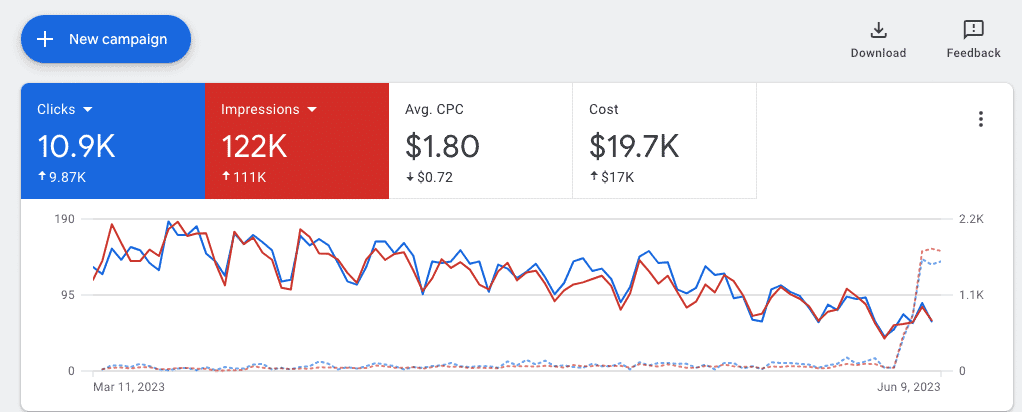
Active management means regularly checking your dashboard — not just creating campaigns and walking away.
6. Keyword Quality Score
Keywords must maintain a Quality Score of 3 or above. Keywords scoring 1 or 2 must be paused or removed. Single-word keywords are not allowed (with some exceptions).
It’s all about relevancy. If your keywords aren’t performing well — that is, if they have a Quality Score below 3 — they have to come out. Google now automatically pauses keywords with a Quality Score of 1 or 2, so this rule increasingly enforces itself, but it’s still worth checking your account regularly.
The Quality Score threshold is 3 or above, not 2. Many older guides cite QS ≥ 2, which is no longer accurate. Google tightened this requirement and now actively enforces the QS ≥ 3 standard.
Be as specific and relevant as possible to increase your Quality Score. Long-tail keywords almost always outperform broad ones for nonprofits. And single-word keywords aren’t allowed except for a small list of approved exceptions (your own brand name, certain medical conditions, and a handful of others Google maintains a list of).
7. Conversion Tracking
You must have valid conversion tracking set up — and accounts created after January 1, 2018, or any account using Smart Bidding, must record at least 1 meaningful conversion per month.
Google wants to see that its grant is being put to good use. This means tracking at least one meaningful conversion. Whether it’s newsletter sign-ups, donation submissions, volunteer registrations, event registrations, or another action that signals user engagement — make sure to track it.
This rule is more important than it looks. Conversion tracking is the gateway to Smart Bidding, which is the gateway to bypassing the $2 CPC cap, which is the gateway to actually competing for valuable keywords. The whole grant economics depend on it.
Navigating these Google Ad Grants rules might seem daunting — but it’s manageable. Once you get the hang of it, you’ll be optimizing your campaigns like a pro, driving valuable traffic to your nonprofit’s website, and making the most out of that precious $10,000 monthly grant.
What’s New in 2026
A few things have changed since this article was first published in 2023. If you’re applying for a new Ad Grants account or auditing an existing one, these matter:
- TechSoup verification has been replaced by Goodstack for new applicants. If you’re applying for the first time in 2026, you’ll go through Goodstack, not TechSoup.
- Performance Max campaigns are now allowed in Ad Grants accounts. They run differently from search ads and are exempt from the 5% CTR rule.
- Google Maps placements are now eligible, which gives nonprofits with physical locations another way to use the grant.
- Quality Score threshold is QS ≥ 3, not 2 (as noted above).
- Smart Bidding is mandatory for all accounts created on or after April 22, 2019.
Always verify details against the Google Ad Grants Policy before making decisions about your account — Google updates these requirements regularly, and the official policy page is the authoritative source.
Stay compliant, stay active, and your grant will keep doing what it’s supposed to do.
This article was last reviewed April 2026 and reflects current Google Ad Grants policy to the best of our knowledge. Rules and program details change — always confirm against the official Google Ad Grants policy before making account decisions.
Frequently asked questions
What happens if my nonprofit drops below the 5% CTR threshold?
Can we use Google Ad Grants for fundraising appeals?
What’s the most common reason nonprofits lose their grant?
How do I actually get more than $2 per click?
Should we manage Google Ad Grants in-house or hire help?
What changed with TechSoup and Goodstack?
How long does it take to apply for and receive Google Ad Grants?
Need help running your Google Ad Grant?
I help Miami-area nonprofits get full value from their $10K/month grant — from initial application through ongoing campaign management and compliance.
See how I can help